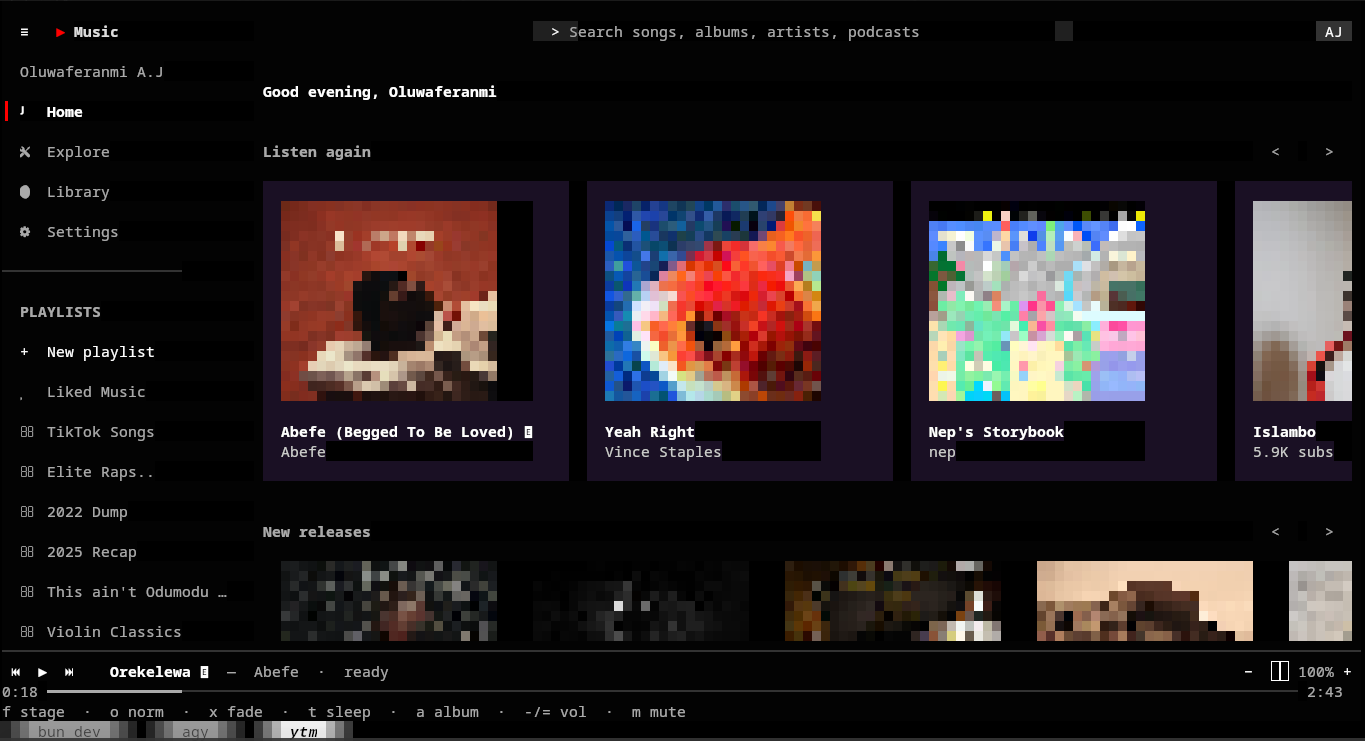
The terminal has long been the undisputed domain of developers, system administrators, and power users a place where speed, raw efficiency, minimalism, and keyboard-centric navigation reign supreme. In an era utterly dominated by resource-heavy web applications and electron-based desktop clients that consume gigabytes of RAM to play a song, returning to the command line for everyday consumer tasks feels like a much-needed breath of fresh air.
This is the story of go-ytm, an ambitious, highly technical project that brings the full, rich YouTube Music experience directly into your terminal.
Through rapid and focused development, go-ytm evolved from a fragile, simple proof-of-concept into a robust, feature-rich audio player. It seamlessly blends the blazing-fast execution, concurrent design, and elegant TUI (Terminal User Interface) capabilities of the Go programming language with the expansive, flexible ecosystem of Python. All of this is orchestrated while leveraging the venerable, battle-tested mpv media player for rock-solid audio playback.
In this comprehensive post, we will take a deep dive into exactly how go-ytm was conceptualised and built. We will break down its architecture and development journey from building the foundation, to expanding core features, and finally polishing the app for a production-ready release. Whether you are a Go enthusiast looking to build better TUIs, a Python scripter curious about hybrid architectures, or just an audiophile fan of terminal applications, there are plenty of architectural lessons to unpack here.
The Architecture: Why Go, Python, and mpv?
Building a terminal-based music player for a proprietary, walled-garden service like YouTube Music presents a unique and frustrating set of challenges. There is no official, publicly documented API for YouTube Music that a developer can simply plug into to get a list of albums or stream a track. Instead, the developer community relies almost entirely on reverse-engineered clients. The most prominent and reliable of these is ytmusicapi, a Python library that expertly mimics standard web client requests to fetch catalogue data, user libraries, and search results.
However, Python is not typically the first choice for building highly interactive, concurrent terminal user interfaces. While libraries like Textual exist, Go provides a level of execution speed, static typing, and single-binary deployment that is hard to beat for CLI tools. Furthermore, Go boasts an incredibly rich ecosystem of modern TUI libraries specifically Charmbracelet’s Bubble Tea and its first-class support for concurrency (goroutines and channels) make it the perfect candidate for managing a complex, heavily stateful user interface.
To bridge this language gap, go-ytm adopted a fascinating hybrid architecture:
| Component | Language / Tech | Responsibility |
|---|---|---|
| Frontend (TUI) | Go, Bubble Tea |
Handles all user input, rendering, and state management using the Model-View-Update (MVU) pattern. It is the face of the application and the sole orchestrator. |
| API Sidecar | Python, Uvicorn |
A local, lightweight HTTP server that wraps the ytmusicapi library. It acts as a dedicated translation layer, fetching raw data and serving it as structured JSON. |
| Audio Engine | mpv |
Handles the actual stream playback. Controlled by Go via IPC (Inter-Process Communication), allowing the UI to reflect real-time playback state without dropouts. |
This trifecta of technologies meant that the project could play to the absolute strengths of each ecosystem without being constrained by their respective weaknesses.
Building the Foundation
The initial challenge was proving that this unconventional hybrid architecture could actually work in practice. Development focused heavily on scaffolding the Go application and establishing the basic communication channels with the Python sidecar.
Embracing the MVU Pattern with Bubble Tea
If you’ve ever built a complex UI, you know that state management is almost always the hardest part. Bubble Tea enforces the Elm architecture, which divides the program into three distinct parts: a Model (the state), a View (how to render the state), and an Update function (how messages alter the state). This paradigm forces developers to keep state mutations highly predictable.
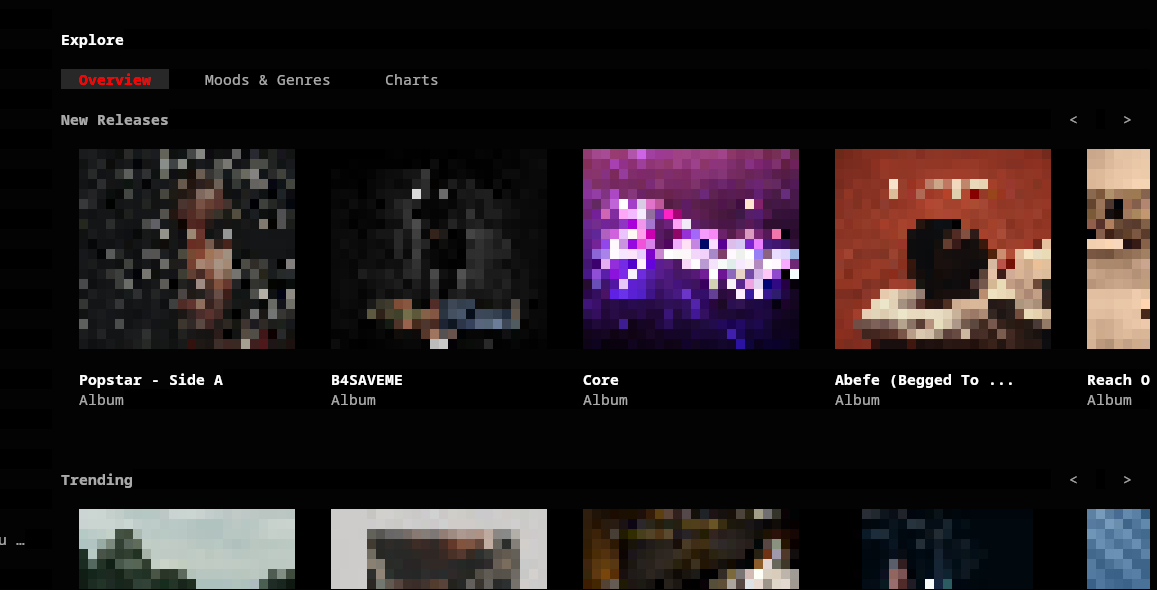
Early on, the team defined a robust, modular model that could handle a complex multi-tab layout. Instead of a simple, continuous scrolling list typical of older CLI tools, go-ytm was designed to feel like a modern graphical app. The initial UI boasted a responsive grid system, an interactive search bar, and a dedicated “Now Playing” stage. To prevent the UI from locking up while waiting for the Python API to boot, a dedicated Bubble Tea loading screen was implemented to handle the asynchronous initialisation of the backend gracefully.
The Python Sidecar and Process Supervision
Initially, managing the Python sidecar was a bit clunky. Basic shell scripts were used to spin up the Python virtual environment and start the Uvicorn server before launching the Go binary. The Go frontend would then communicate with the Python backend over standard HTTP TCP ports. While this worked reasonably well for prototyping, it introduced massive friction for end-users who just wanted to run a single command and immediately listen to music.
To solve this UX hurdle, the project quickly pivoted to a more integrated, sophisticated approach. The Go application was extended with a native supervisor module (internal/apirunner). Go took direct, authoritative ownership of the Python virtual environment’s lifecycle. Now, when a user runs ytm, Go checks for the virtual environment, transparently installs pip dependencies if necessary, starts the Uvicorn server in the background, and continuously performs health checks all before rendering the very first frame of the UI. This was a critical architectural win, ensuring seamless and isolated execution without requiring any external orchestration by the user.
Laying the Groundwork for Offline Playback
Even in its absolute infancy, go-ytm prioritised a feature often neglected by modern web apps: offline playback. A background download manager was introduced early to handle the batch downloading of tracks. By utilising Go’s lightweight goroutines, this download manager could effortlessly track multiple in-flight downloads and report their progress back to the Bubble Tea update loop via channels. This allowed the UI to surface live progress bars to the user without ever blocking the main interface thread.
Core Expansion and UI Polish
With the hybrid foundation stable, development shifted focus entirely toward making go-ytm feel like a premium, daily-driver music player. This meant significantly expanding the audio engine, refining the UI aesthetics, and addressing the inevitable synchronisation issues that arise in distributed, multi-process systems.
A Robust Audio Engine and mpv IPC
A music player is ultimately only as good as its playback experience. During this phase, massive additions were made to the Go-to-mpv communication layer. By hooking into mpv’s JSON IPC protocol over a socket, Go could precisely control the audio engine. True gapless crossfading and track preloading were implemented, ensuring that transitions between songs felt seamless and studio-quality.
Advanced audio capabilities were surfaced directly in the TUI. Users could now actively toggle volume normalisation and apply real-time audio filters like silence skipping, tempo adjustment, pitch shifting, and multi-band equalisation. Implementing these features required meticulous, thread-safe synchronization between the Go state and the rapid, asynchronous event streams firing from mpv. Shuffle algorithms and repeating queue modes were also finalised during this phase, turning a basic streaming wrapper into a fully-fledged media library manager.
UI Reimagined: The Kitty Graphics Protocol
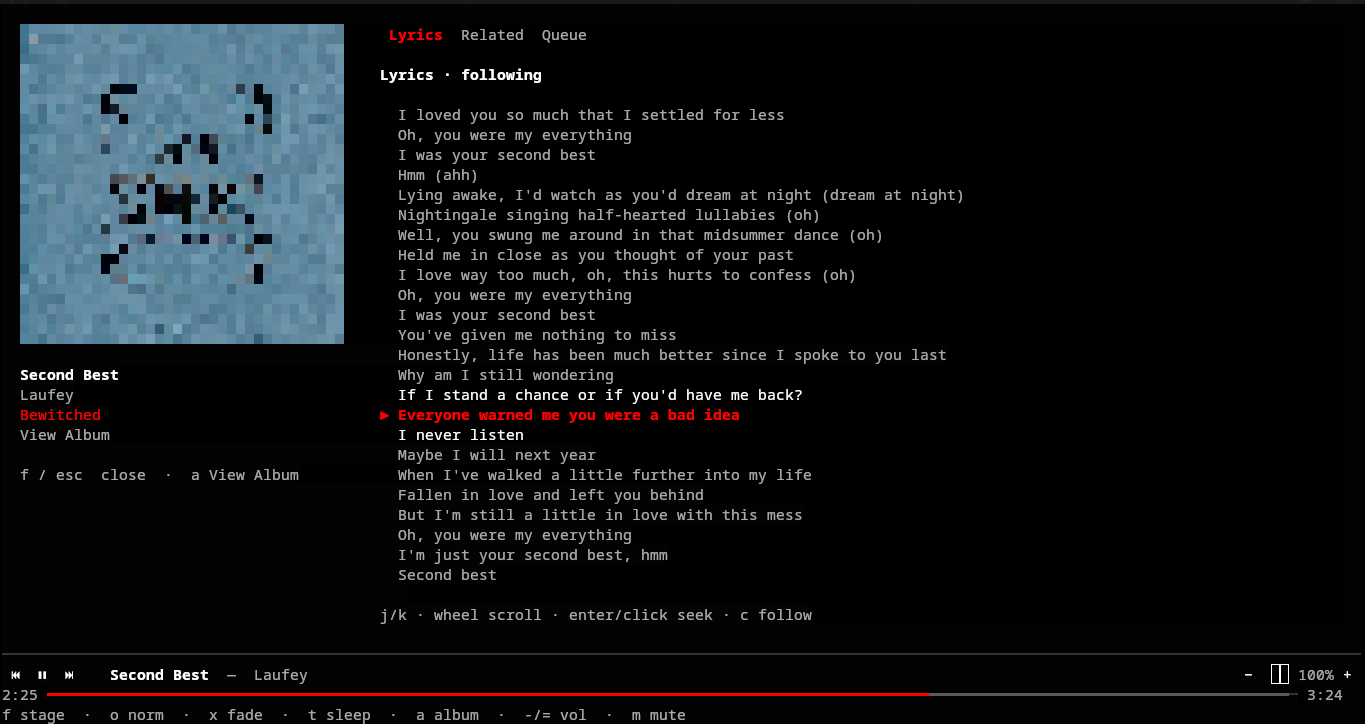
The terminal interface received major visual upgrades. The “Now Playing” view was expanded into a fullscreen, multi-pane stage that included perfectly synced lyrics, pulling data dynamically via the youtube-transcript-api through the Python sidecar.
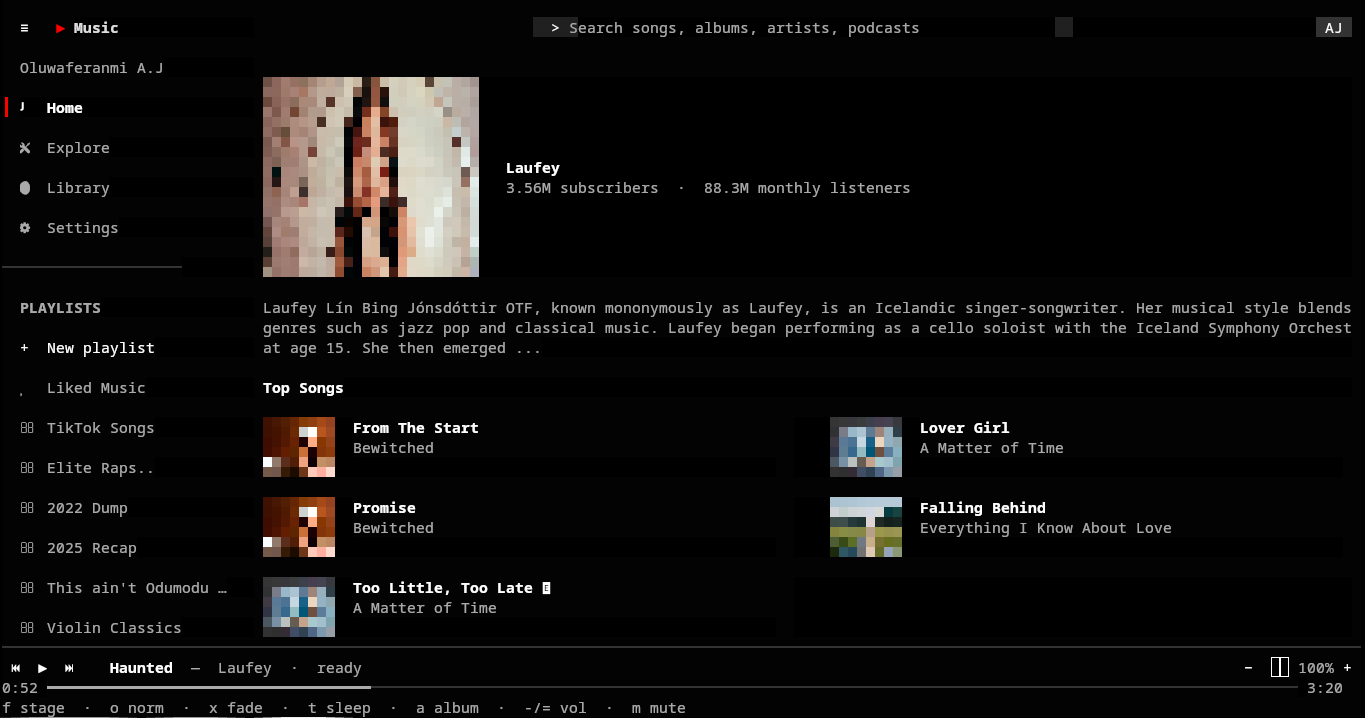
The Artist page was completely redesigned. Instead of just listing albums textually, it now features an artwork banner and an interactive album grid with carousel scrolling. But how do you render album art in a terminal? For users with modern terminal emulators that support the Kitty graphics protocol, go-ytm began transmitting image data directly via specialised terminal escape sequences. This allowed it to render stunning, high-resolution, true-colour album art directly in the grid, bypassing older, clunky ASCII-art rendering libraries. For unsupported terminals, it intelligently detects capabilities and gracefully degrades to text, ensuring the app never breaks.
Hardening the Backend and Unix Sockets
As the features grew, the Python sidecar naturally began to suffer from organisational bloat. It was completely refactored into modular, distinct routers (auth, catalog, explore, library, search), drastically improving code maintainability.
A major architectural shift during this phase was the transition away from standard HTTP over TCP. Initially, the Python API exposed a standard local HTTP server on a TCP port. While functional, this approach introduced a glaring security risk: anyone (or any malicious background process) on the local machine could potentially discover the port and hijack the API, gaining access to the user’s YouTube Music account and browsing data.
To mitigate this, the IPC communication between Go and Python was upgraded to use highly secure Unix domain sockets. Unix sockets rely on file system permissions, ensuring that only the user running go-ytm can access the API. This transition not only completely eliminated the risk of local TCP hijacking and prevented annoying port collisions, but it also drastically reduced latency and improved local performance.
For good measure, the API was further locked down with strict token-based authentication. The Go supervisor dynamically generates a highly secure, random 32-character token on the fly using /dev/urandom during startup. This token is passed to both the Go client and the Python backend. On the Python side, a dedicated FastAPI middleware intercepts every incoming request. Unless the request is hitting the /health endpoint, the middleware strictly verifies that the X-API-Token header matches the generated environment variable, returning a 403 Unauthorized if they don’t align. This defense-in-depth approach ensures the API is completely sealed off.
Performance optimizations were another major theme. Rapid page navigation in the TUI would previously queue up stale API requests, lagging the UI behind the user’s keystrokes. This was elegantly resolved by implementing Go’s native request cancellation contexts. Pure mouse motion events were also explicitly suppressed in the TUI to prevent unnecessary render cycles, leading to a buttery-smooth, snappy experience.
Production Readiness and Release
Beyond building the core features, a major priority became production readiness. A project can boast amazing features, but if it’s difficult to install, configure, debug, or deploy, it will remain obscure.
Advanced Offline Persistence with SQLite
The background download manager was battle-tested and expanded to support queuing entire tracklists, full albums, and massive user playlists. The underlying local storage layer was heavily refined into a structured SQLite database schema. This schema was designed to persist not just the physical offline tracks, but complex metadata, high-res thumbnails, and even user navigation states. If a user closed go-ytm while deep inside an Explore tab or browsing their library, the SQLite cache would ensure it instantly restored that exact state upon the next launch, resulting in zero perceived load times.
Search capabilities were vastly expanded beyond just songs and albums to comprehensively cover podcasts, user profiles, and podcast episodes. To handle frustrating edge cases where the default lyrics extractor was rate-limited by YouTube’s servers, a fallback mechanism was seamlessly integrated.
Seamless Authentication Workflows
YouTube Music absolutely requires cookies and OAuth headers to access personalized libraries and recommendations. Authentication flows were hardened to be as user-friendly as possible within a terminal. Users were given the ability to simply paste request headers directly from a logged-in browser session or provide a standard Google client_secret.json via a beautifully formatted TUI Settings tab. Logic was added to intelligently invalidate auth-dependent caches upon sign-in and to automatically sign the user out if the API returned 400 errors, ensuring the app never got hopelessly stuck in a bad, unauthenticated state.
Developer Experience, CLI Tooling, and CI/CD
To make go-ytm a first-class citizen in the terminal, the developer experience and CLI were vastly expanded. The project adopted slog for structured, leveled logging, making debugging the Go-Python-mpv triangle infinitely easier. A ytm doctor command was added to diagnose complex environment issues with mpv dependencies, the Python virtual environment state, or Unix socket permissions. A handy auto-update mechanism (ytm upgrade) was also introduced.
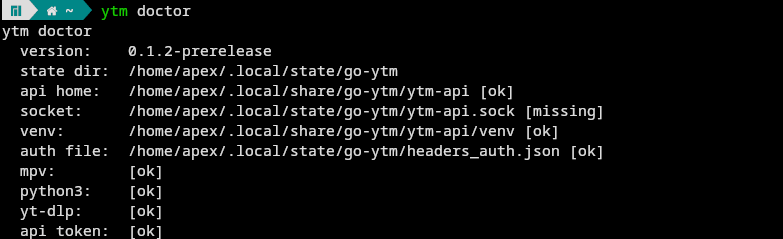
For deployment, the team implemented an automated, robust continuous integration pipeline using GitHub Actions and GoReleaser. This pipeline completely automated the packaging of optimized Linux binaries (amd64 / arm64) alongside a bundled version of the Python API tree. The release builds were hardened to correctly map the API virtual environment at runtime, isolating it completely from the user’s system Python packages. A simple curl | bash install script was published, reducing the barrier to entry to a single, easily copy-pasted command.
Architectural Lessons Learned
Building go-ytm provided several fascinating insights into modern terminal application development:
- Don’t Fear the Hybrid Stack: While maintaining two disparate languages (Go and Python) absolutely adds complexity, it is often the pragmatist’s choice. Rewriting the entire
ytmusicapiecosystem from scratch in Go would have been a monumental, brittle, and never-ending task. By using Python for what it’s historically best at (rapid ecosystem integration and APIs) and Go for what it’s best at (blistering concurrency and TUIs), the project moved exponentially faster. - Supervision is Key: Moving the lifecycle management of the Python sidecar directly into the Go binary was a total game-changer for user adoption. Users simply do not want to run
docker-composeor manage multiple background daemon scripts just to launch a terminal app. A single compiled binary that orchestrates its own dependencies is the gold standard for CLI tools. - IPC Performance Matters: Switching from HTTP over TCP to Unix domain sockets with context cancellation drastically improved the responsiveness of the TUI. When building fast UIs that expect immediate feedback, network overhead even strictly on localhost can quickly become a noticeable bottleneck.
- Graceful Degradation: Terminals are notoriously fragmented in their capabilities. By proactively supporting advanced features like the Kitty graphics protocol for images, while heavily investing in graceful degradation to ASCII/text for unsupported terminals,
go-ytmensures it looks visually stunning where possible but remains highly functional absolutely everywhere else.
Conclusion
go-ytm stands as a brilliant testament to the enduring power and flexibility of the modern terminal ecosystem. In a remarkably short time, it evolved from a simple Python API wrapper into a comprehensive, highly polished, and visually striking music client. It definitively proves that with modern frameworks like Bubble Tea and a clever, pragmatic architectural design, you absolutely do not need a heavy, bloated web browser to deliver a premium, interactive software experience.
The command line is no longer just a place for viewing log files and managing system configurations; it is a thriving platform for rich, engaging applications. Whether you’re looking for a distraction-free, low-resource way to listen to music while you write code, or you just appreciate the sheer elegance of well-crafted terminal software, go-ytm is definitely worth a spin.
To try it yourself, explore the source code, or contribute to its ongoing development, head over to the go-ytm GitHub repository and run the install script.
If you enjoyed this technical deep dive, be sure to check out my other portfolio projects or read more on the blog. Happy listening!
